

Boost is a paid add-on for one listing. It gives that listing more visibility in search while it is active.
What Boost does
Your listing gets extra weight in our search ranking, so it appears higher in default search results for the searches it matches. It also shows a "Featured" badge on its search card and listing page.
Boost doesn't guarantee a fixed position or a number of inquiries. How well your listing matches the search still counts, and renters can choose to sort results another way.
How to boost a listing
1. Go to your listings and click "Boost my space" on the listing. The listing must be published and public, and not locked or already boosted.
2. Choose weekly or monthly billing. The page shows the price and the renewal terms before you pay.
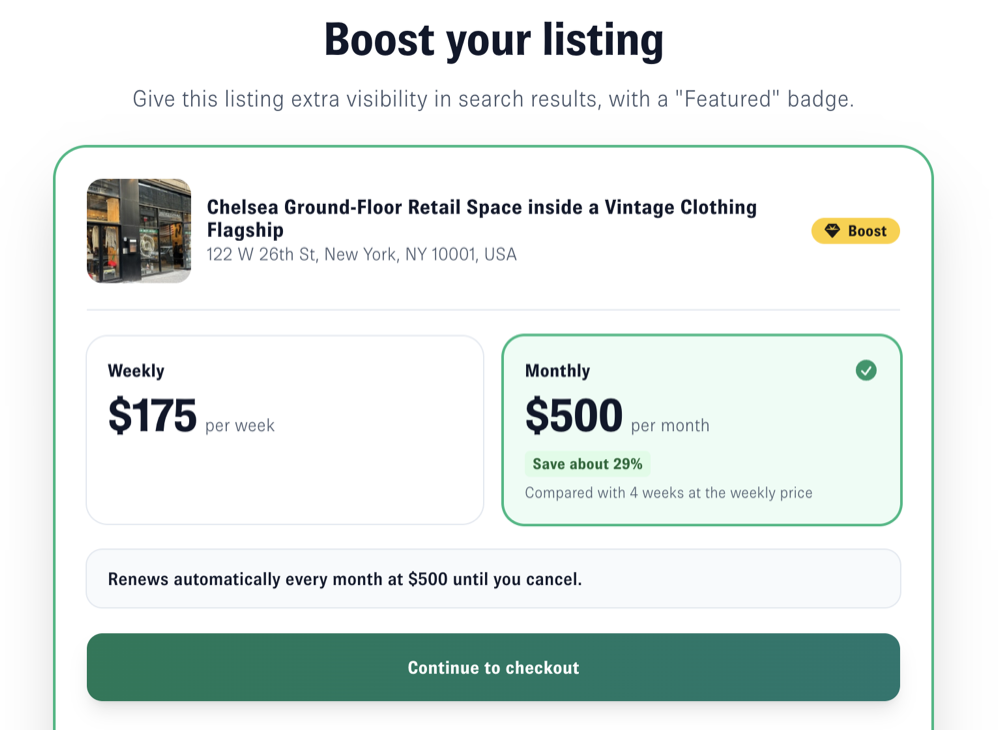
3. Enter your payment details and confirm.
When it starts
Your boost starts as soon as your payment is confirmed, usually within a few minutes.
Renewal
Your boost renews automatically: a weekly boost every 7 days, on the same weekday it started, and a monthly boost on the same day of the month it started, or on the last day of the month in shorter months. You are charged each time until you cancel. You can see your next charge date in My subscriptions.
Plans and several listings
You can boost a listing on the Basic plan or the Starter plan. Boost is billed separately and doesn't change your plan.
Each listing has its own boost, with its own billing period and charge date, so you can mix weekly and monthly. A listing can only have one boost at a time.
To change or stop a boost, see How to manage or cancel a boost.